# Routing Panels

An example of a router panel set up can be seen below. These can be different depending on the selected configuration and device.

![Screenshot 2025-06-25 at 13.12.02.png](https://wiki.skaarhoj.com/uploads/images/gallery/2025-06/scaled-1680-/screenshot-2025-06-25-at-13-12-02.png)

  
**Device Selector**

![Screenshot 2025-06-25 at 12.52.13.png](https://wiki.skaarhoj.com/uploads/images/gallery/2025-06/scaled-1680-/screenshot-2025-06-25-at-12-52-13.png)

<table border="2" cellpadding="0" cellspacing="0" id="bkmrk-column-description-d-0" style="width: 100%; height: 589.398px;"><tbody><tr style="height: 35.3984px;"><td class="align-left" valign="top">**Column**

</td><td style="width: 86.534%; height: 35.3984px;" valign="top">**Description**

</td></tr><tr style="height: 35.3984px;"><td class="align-left" valign="top">Order

</td><td style="width: 86.534%; height: 35.3984px;" valign="top">Allows for quick rearranging of router order. Right clicking on order will allow for deleting the row.

</td></tr><tr style="height: 35.3984px;"><td class="align-left" valign="top">Mute

</td><td style="width: 86.534%; height: 35.3984px;" valign="top">Allows for removing access to a specific router or to leave a blank spot on the panel

</td></tr><tr style="height: 35.3984px;"><td class="align-left" valign="top">Bound Device

</td><td style="width: 86.534%; height: 35.3984px;" valign="top">Allows for the selecting of a specific connected routing device.

</td></tr><tr style="height: 57.7969px;"><td class="align-left" valign="top">Device Index

</td><td style="width: 86.534%; height: 57.7969px;" valign="top">Ties the selector to a specific device associated with the config. See Device Details for the device index number.

</td></tr><tr style="height: 35.3984px;"><td class="align-left" valign="top">Device Name

</td><td style="width: 86.534%; height: 35.3984px;" valign="top">Customizable name to appear on the displays. Character limit is determined by size of display and can vary.

</td></tr><tr style="height: 35.3984px;"><td class="align-left">Description

</td><td style="width: 86.534%; height: 35.3984px;">Customizable description. Character limit is determined by size of display and can vary.

</td></tr><tr style="height: 57.7969px;"><td class="align-left">Device Configuration

</td><td style="width: 86.534%; height: 57.7969px;">Selects the protocol based configuration associated with the router. Needed protocol can be seen in the Devices section, each device is grouped into their native protocols.

</td></tr><tr style="height: 57.7969px;"><td class="align-left">Setting

</td><td style="width: 86.534%; height: 57.7969px;">Setup some extra configurable attributes on some specific device configs. For routers this is usual Input and Output mapping. **See Settings section below.**

</td></tr><tr style="height: 41.7812px;"><td class="align-left">![Screenshot 2025-06-25 at 14.13.03.png](https://wiki.skaarhoj.com/uploads/images/gallery/2025-06/scaled-1680-/screenshot-2025-06-25-at-14-13-03.png)

</td><td style="width: 86.534%; height: 41.7812px;">Delete the row.

</td></tr><tr style="height: 41.7656px;"><td class="align-left">![Screenshot 2025-06-25 at 11.13.05.png](https://wiki.skaarhoj.com/uploads/images/gallery/2025-06/scaled-1680-/screenshot-2025-06-25-at-11-13-05.png)

</td><td style="width: 86.534%; height: 41.7656px;">Duplicates the details of the column.

</td></tr><tr style="height: 40px;"><td class="align-left">![Screenshot 2025-06-25 at 11.13.16.png](https://wiki.skaarhoj.com/uploads/images/gallery/2025-06/scaled-1680-/screenshot-2025-06-25-at-11-13-16.png)

</td><td style="width: 86.534%; height: 40px;"> Increments the number in the column by +1. </td></tr><tr style="height: 47.7109px;"><td class="align-left">![Screenshot 2025-06-25 at 11.16.30.png](https://wiki.skaarhoj.com/uploads/images/gallery/2025-06/scaled-1680-/screenshot-2025-06-25-at-11-16-30.png)

</td><td style="width: 86.534%; height: 47.7109px;">Adds a new line to create additional routing select. </td></tr><tr style="height: 32.3594px;"><td class="align-left">![Screenshot 2025-06-25 at 11.16.40.png](https://wiki.skaarhoj.com/uploads/images/gallery/2025-06/scaled-1680-/screenshot-2025-06-25-at-11-16-40.png)

</td><td style="width: 86.534%; height: 32.3594px;">Opens a table to create multiple new routing selects. **See Batch Create section below.**</td></tr></tbody></table>

**Batch Create**

![Screenshot 2025-06-25 at 14.33.47.png](https://wiki.skaarhoj.com/uploads/images/gallery/2025-06/scaled-1680-/screenshot-2025-06-25-at-14-33-47.png)

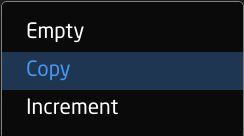
<table border="1" id="bkmrk-amount-of-rows-to-cr"><colgroup><col></col><col></col></colgroup><tbody><tr><td>Amount of Rows to Create</td><td>The number of additional rows to be created.</td></tr><tr><td>Column Name</td><td>Which settings table row's info being referenced.</td></tr><tr><td>Populate Behavior</td><td>Select if the settings table row is to be empty, copied, or incremented by 1. [![Screenshot 2025-06-25 at 11.24.21.png](https://wiki.skaarhoj.com/uploads/images/gallery/2025-06/scaled-1680-/screenshot-2025-06-25-at-11-24-21.png)](https://wiki.skaarhoj.com/uploads/images/gallery/2025-06/screenshot-2025-06-25-at-11-24-21.png)
</td></tr></tbody></table>

  
**Settings**

![Screenshot 2025-06-25 at 14.48.32.png](https://wiki.skaarhoj.com/uploads/images/gallery/2025-06/scaled-1680-/screenshot-2025-06-25-at-14-48-32.png)

<table border="2" cellpadding="0" cellspacing="0" id="bkmrk-column-description-d"><tbody><tr><td valign="top"><span style="color: #000000; font-family: Avenir Next; font-size: xx-small;">**Column**</span>

</td><td valign="top"><span style="color: #000000; font-family: Avenir Next; font-size: xx-small;">**Description**</span>

</td></tr><tr><td class="align-center" valign="top"><span style="color: #000000; font-family: Avenir Next; font-size: xx-small;">Order</span></td><td valign="top"><span style="color: #000000; font-family: Avenir Next; font-size: xx-small;">Allows for quick rearranging of input/output order. Right clicking on drag will allow for deleting the row.</span></td></tr><tr><td class="align-center" valign="top"><span style="color: #000000; font-family: Avenir Next; font-size: xx-small;">Mute</span></td><td valign="top"><span style="color: #000000; font-family: Avenir Next; font-size: xx-small;">Allows for removing access to a specific input/output or to leave a blank spot on the panel</span></td></tr><tr><td class="align-center" valign="top"><span style="color: #000000; font-family: Avenir Next; font-size: xx-small;">Output Number/Input Number</span></td><td valign="top"><span style="color: #000000; font-family: Avenir Next; font-size: xx-small;">Ties the selector to the specific input/output. This is found is determined by the individual router.</span></td></tr><tr><td class="align-center" valign="top"><span style="color: #000000; font-family: Avenir Next; font-size: xx-small;">Alternative Label</span></td><td valign="top"><span style="color: #000000; font-family: Avenir Next; font-size: xx-small;">Customizable name to appear on the displays. Character limit is determined by size of display and can vary.<span class="Apple-converted-space"> </span></span></td></tr><tr><td class="align-center" valign="top"><span style="color: #000000; font-family: Avenir Next; font-size: xx-small;">Color</span></td><td valign="top"><span style="color: #000000; font-family: Avenir Next; font-size: xx-small;">Sets the button feedback color. Color options are: OFF, WHITE, WARM, RED, ROSE, PINK, PURPLE, AMBER, YELLOW, DARKBLUE, BLUE, ICE, CYAN, SPRING, GREEN, MINT.   
The format for color selection is all large letters with no spaces between words.<span class="Apple-converted-space"> </span></span></td></tr><tr><td>![Screenshot 2025-06-25 at 14.13.03.png](https://wiki.skaarhoj.com/uploads/images/gallery/2025-06/scaled-1680-/screenshot-2025-06-25-at-14-13-03.png)</td><td>Delete the row. </td></tr></tbody></table>

**Advanced Layout Configurations**

The layout of the routing configurations are able to be change within the configuration. Within the Advanced Layout Configurations settings table, it is possible to set up page sizes and offsets for each of the configurations as well as set up a prefered order of the layouts. Not all columns are used for each device configuration.

![Screenshot 2025-06-26 at 10.06.22 AM.png](https://wiki.skaarhoj.com/uploads/images/gallery/2025-06/scaled-1680-/screenshot-2025-06-26-at-10-06-22-am.png)

<table border="1" class="align-left" id="bkmrk-order-allows-for-qui" style="border-collapse: collapse; width: 97.9762%; height: 757.117px;"><colgroup><col style="width: 22.3863%;"></col><col style="width: 77.6137%;"></col></colgroup><tbody><tr style="height: 35.3984px;"><td style="height: 35.3984px;" valign="top"><span style="color: #000000; font-family: Avenir Next; font-size: xx-small;">Order</span>

</td><td style="height: 35.3984px;" valign="top"><span style="color: #000000; font-family: Avenir Next; font-size: xx-small;">Allows for quick rearranging of layout order. Right clicking on drag will allow for deleting the row.</span>

</td></tr><tr style="height: 35.3984px;"><td style="height: 35.3984px;" valign="top"><span style="color: #000000; font-family: Avenir Next; font-size: xx-small;">Mute</span>

</td><td style="height: 35.3984px;" valign="top"><span style="color: #000000; font-family: Avenir Next; font-size: xx-small;">Allows for removing access to a specific layout or to leave a blank spot on the panel</span>

</td></tr><tr style="height: 35.3984px;"><td class="align-center" style="height: 35.3984px;">Layout Number

</td><td style="height: 35.3984px;">Out internal reference number for the layout

</td></tr><tr style="height: 35.3984px;"><td class="align-center" style="height: 35.3984px;">Label

</td><td style="height: 35.3984px;">Text in displays of panel

</td></tr><tr style="height: 35.3984px;"><td class="align-center" style="height: 35.3984px;">Input Page Size

</td><td>Input Page Size

</td></tr><tr style="height: 35.3984px;"><td class="align-center" style="height: 35.3984px;">Input Page Offset

</td><td>Input Page Offset

</td></tr><tr style="height: 35.3984px;"><td class="align-center" style="height: 35.3984px;">Output Page Size

</td><td>Output Page Size

</td></tr><tr style="height: 35.3984px;"><td class="align-center" style="height: 35.3984px;">Output Page Offset

</td><td>Output Page Offset

</td></tr><tr style="height: 35.3984px;"><td class="align-center" style="height: 35.3984px;">Level Page Size

</td><td>Level Page Size

</td></tr><tr style="height: 35.3984px;"><td class="align-center" style="height: 35.3984px;">Level Page Offset

</td><td>Level Page Offset

</td></tr><tr style="height: 57.7969px;"><td class="align-center" style="height: 57.7969px;">Preset Recall Page Size

</td><td>Preset Recall Page Size

</td></tr><tr style="height: 57.7969px;"><td class="align-center" style="height: 57.7969px;">Preset Recall Page Offset

</td><td>Preset Recall Page Offset

</td></tr><tr style="height: 57.7969px;"><td class="align-center" style="height: 57.7969px;">Preset Store Page Size

</td><td>Preset Store Page Size

</td></tr><tr style="height: 35.3984px;"><td class="align-center" style="height: 35.3984px;">Preset Store Offset

</td><td>Preset Store Offset

</td></tr><tr style="height: 35.3984px;"><td class="align-center" style="height: 35.3984px;">Salvos Page Size

</td><td>Salvos Page Size

</td></tr><tr style="height: 35.3984px;"><td class="align-center" style="height: 35.3984px;">Salvos Page Offset

</td><td>Salvos Page Offset

</td></tr><tr style="height: 41.7812px;"><td style="height: 41.7812px;">![Screenshot 2025-06-25 at 14.13.03.png](https://wiki.skaarhoj.com/uploads/images/gallery/2025-06/scaled-1680-/screenshot-2025-06-25-at-14-13-03.png)

</td><td style="height: 41.7812px;">Delete the row.

</td></tr><tr style="height: 41.7656px;"><td style="height: 41.7656px;">![Screenshot 2025-06-25 at 11.13.05.png](https://wiki.skaarhoj.com/uploads/images/gallery/2025-06/scaled-1680-/screenshot-2025-06-25-at-11-13-05.png)

</td><td style="height: 41.7656px;">Duplicates the details of the column.

</td></tr><tr style="height: 40px;"><td style="height: 40px;">![Screenshot 2025-06-25 at 11.13.16.png](https://wiki.skaarhoj.com/uploads/images/gallery/2025-06/scaled-1680-/screenshot-2025-06-25-at-11-13-16.png)

</td><td style="height: 40px;"> Increments the number in the column by +1.

</td></tr></tbody></table>