# DataVideo PTR-10 and PTC-150

Some DataVideo devices only support their proprietary DVIP protocol over the network. For connection and control using the Visca protocol from a Skaarhoj panel, an ethernet to serial converter can be used.

**Ethernet to Serial connection**

To communicate via serial (RS-485) to the camera you need an Ethernet-Serial converter. We suggest you get a TCP232-306 from USR- [<span class="s1">https://www.usriot.com/products/serial-to-ethernet-server.html </span>](https://www.usriot.com/products/serial-to-ethernet-server.html)

<p class="callout info">The TCP232-306 is not the only ethernet to serial converter that works, but is the model we tested in house with the DataVideo devices. </p>

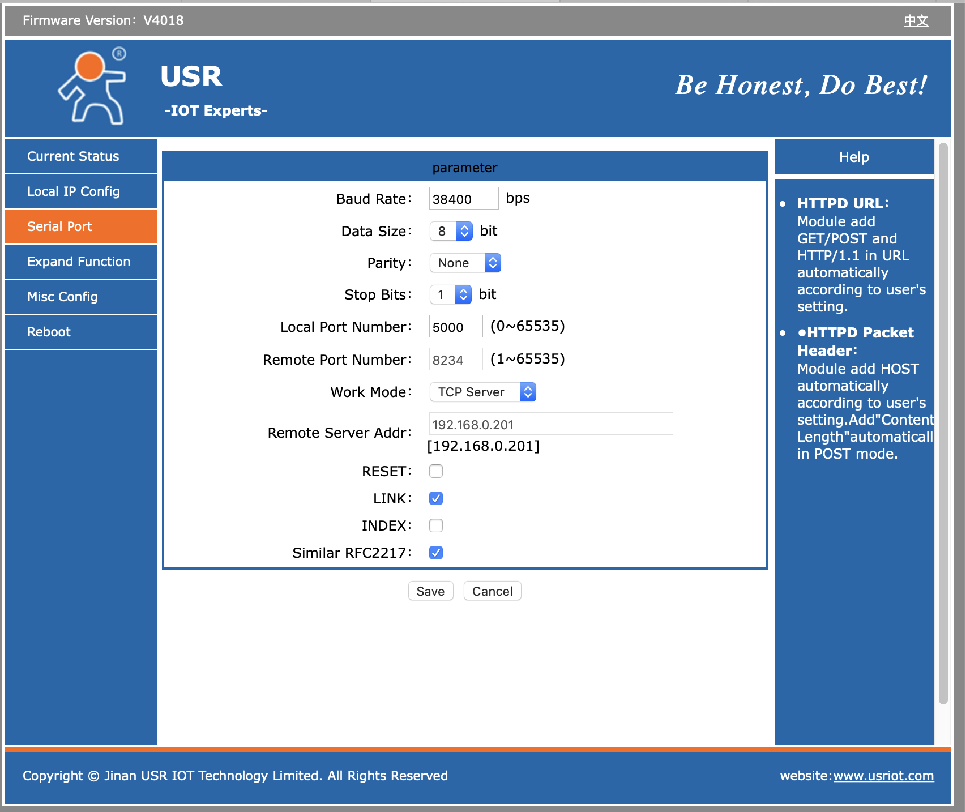
Below you will find screenshots of how to configure the USR-TCP232-306 converter (found on the web interface of the TCP232-306). Notice the IP address of the TCP232-306 (Static IP Address) must match the IP settings of the Datavideo PTC-150 Device Core.

**![image.png](https://wiki.skaarhoj.com/uploads/images/gallery/2026-04/scaled-1680-/image.png)**
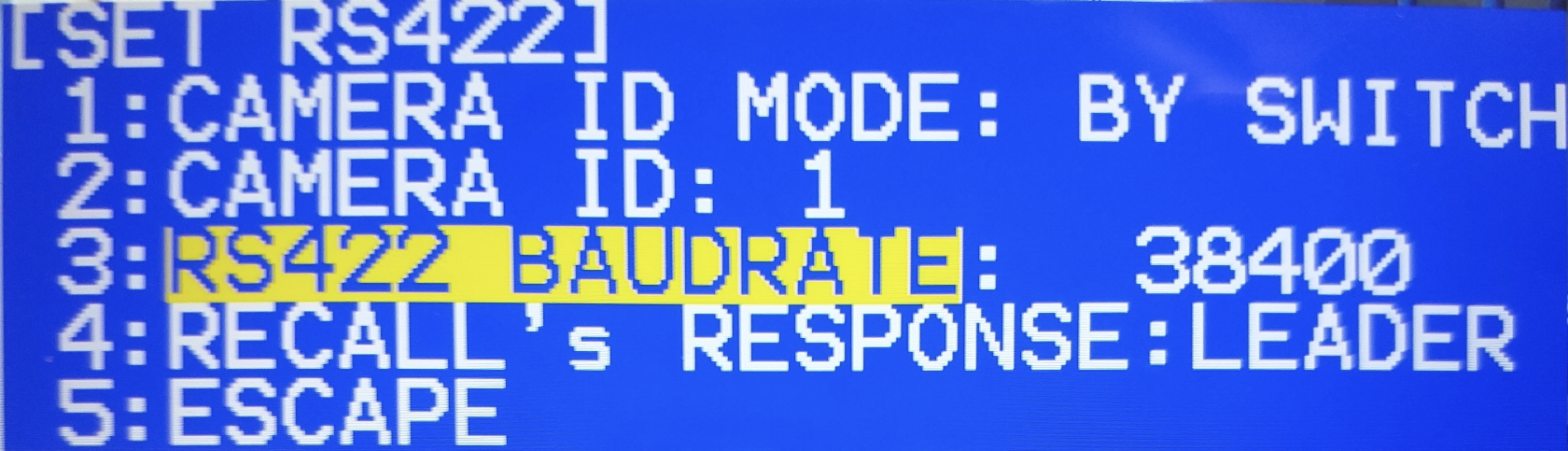
The specific Baud Rate used is set in the Camera’s OSD.

**![image.png](https://wiki.skaarhoj.com/uploads/images/gallery/2026-04/scaled-1680-/N6Bimage.png)**
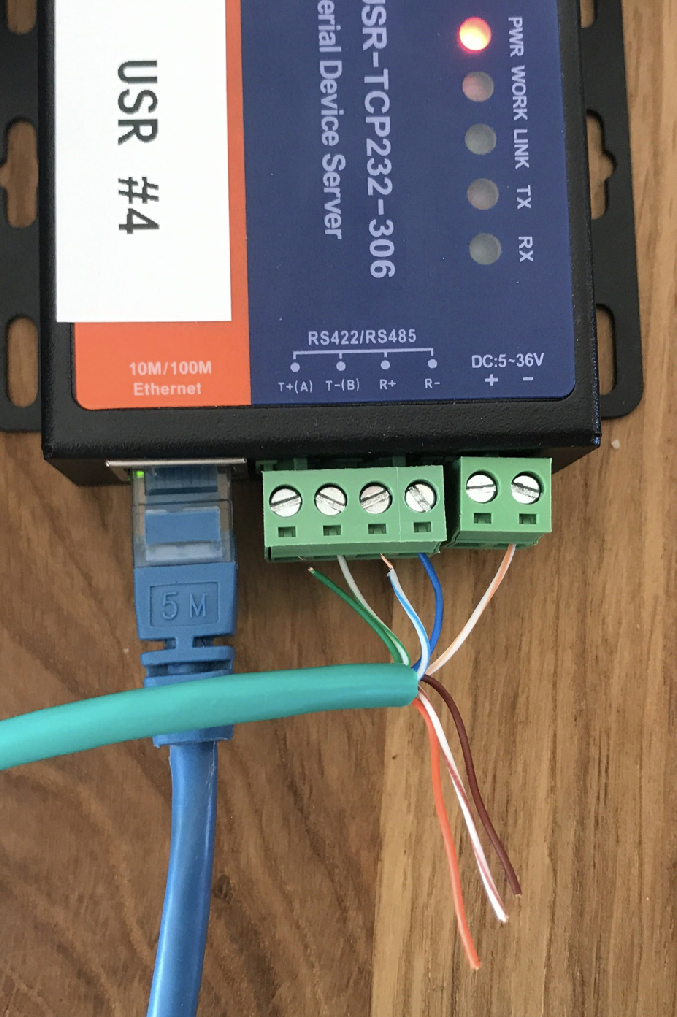
Wiring to the Camera/Converter

**![image.png](https://wiki.skaarhoj.com/uploads/images/gallery/2026-04/scaled-1680-/Bc9image.png)**

<table cellpadding="0" cellspacing="0" class=" align-center" id="bkmrk-serial-converter-rj4" style="height: 259px; width: 35%;"><tbody><tr><td style="width: 49.8299%;" valign="top">**<span style="color: #000000; font-family: Helvetica; font-size: small;">Serial Converter</span>**

</td><td style="width: 49.8299%;" valign="top">**<span style="color: #000000; font-family: Helvetica; font-size: small;">RJ45</span>**

</td></tr><tr><td style="width: 49.8299%;" valign="top">**<span style="color: #000000; font-family: Helvetica; font-size: small;">GND</span>**

</td><td style="width: 49.8299%;" valign="top">**<span style="color: #000000; font-family: Arial; font-size: xx-small;">White/Orange</span>**

</td></tr><tr><td style="width: 49.8299%;" valign="top">**<span style="color: #000000; font-family: Helvetica; font-size: small;">Rx-</span>**

</td><td style="width: 49.8299%;" valign="top">**<span style="color: #000000; font-family: Arial; font-size: xx-small;">Blue</span>**

</td></tr><tr><td style="width: 49.8299%;" valign="top">**<span style="color: #000000; font-family: Helvetica; font-size: small;">Rx+</span>**

</td><td style="width: 49.8299%;" valign="top">**<span style="color: #000000; font-family: Arial; font-size: xx-small;">White/Blue</span>**

</td></tr><tr><td style="width: 49.8299%;" valign="top">**<span style="color: #000000; font-family: Helvetica; font-size: small;">Tx-</span>**

</td><td style="width: 49.8299%;" valign="top">**<span style="color: #000000; font-family: Arial; font-size: xx-small;">White/Green</span>**

</td></tr><tr><td style="width: 49.8299%;" valign="top">**<span style="color: #000000; font-family: Helvetica; font-size: small;">TX+</span>**

</td><td style="width: 49.8299%;" valign="top">**<span style="color: #000000; font-family: Arial; font-size: xx-small;">Green</span>**

</td></tr></tbody></table>

**Dip Switches**

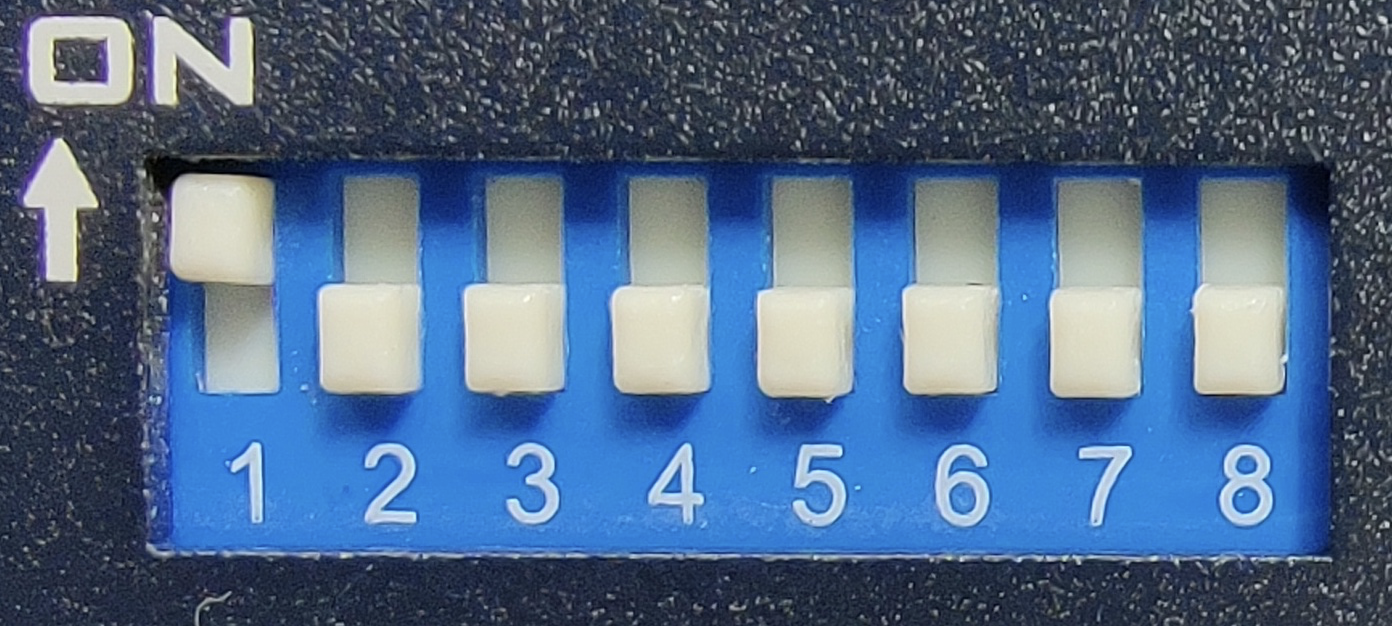
On PT Head dip switch settings.
![image.png](https://wiki.skaarhoj.com/uploads/images/gallery/2026-04/scaled-1680-/FMSimage.png)

<table border="1" id="bkmrk-function-switch-on%2Fo" style="border-collapse: collapse; width: 81.3095%;"><colgroup><col style="width: 33.3731%;"></col><col style="width: 9.41597%;"></col><col style="width: 57.211%;"></col></colgroup><tbody><tr><td>Function</td><td>Switch</td><td>On/Off</td></tr><tr><td>Visca-ID 1</td><td>1</td><td>On</td></tr><tr><td>Visca-ID 2</td><td>2</td><td>Off</td></tr><tr><td>Visca-ID 3</td><td>3</td><td>Off</td></tr><tr><td>Remote Control Protocol</td><td>4</td><td>Off for RS-422</td></tr><tr><td>Video Resolution</td><td>5-7</td><td>See Camera manual for desired resolution</td></tr><tr><td>Video Mode Selection Method</td><td>8</td><td class="align-left">Off</td></tr></tbody></table>

See the Datavideo PTR-10 /PTC-150 Instruction Manual for detailed Dip Switch configuration.