When you are finished editing the Setup page, remember to press Save at the bottom of the page!
##### Switcher The switcher provides program and preview tally, and is what the system controls in full auto mode. The easiest way to set it up is the 'Discover' button, which lists the switchers found on the connected cores and fills in the parameters for you. The 'Edit' button opens the raw parameter mappings, in case you want to enter them manually: [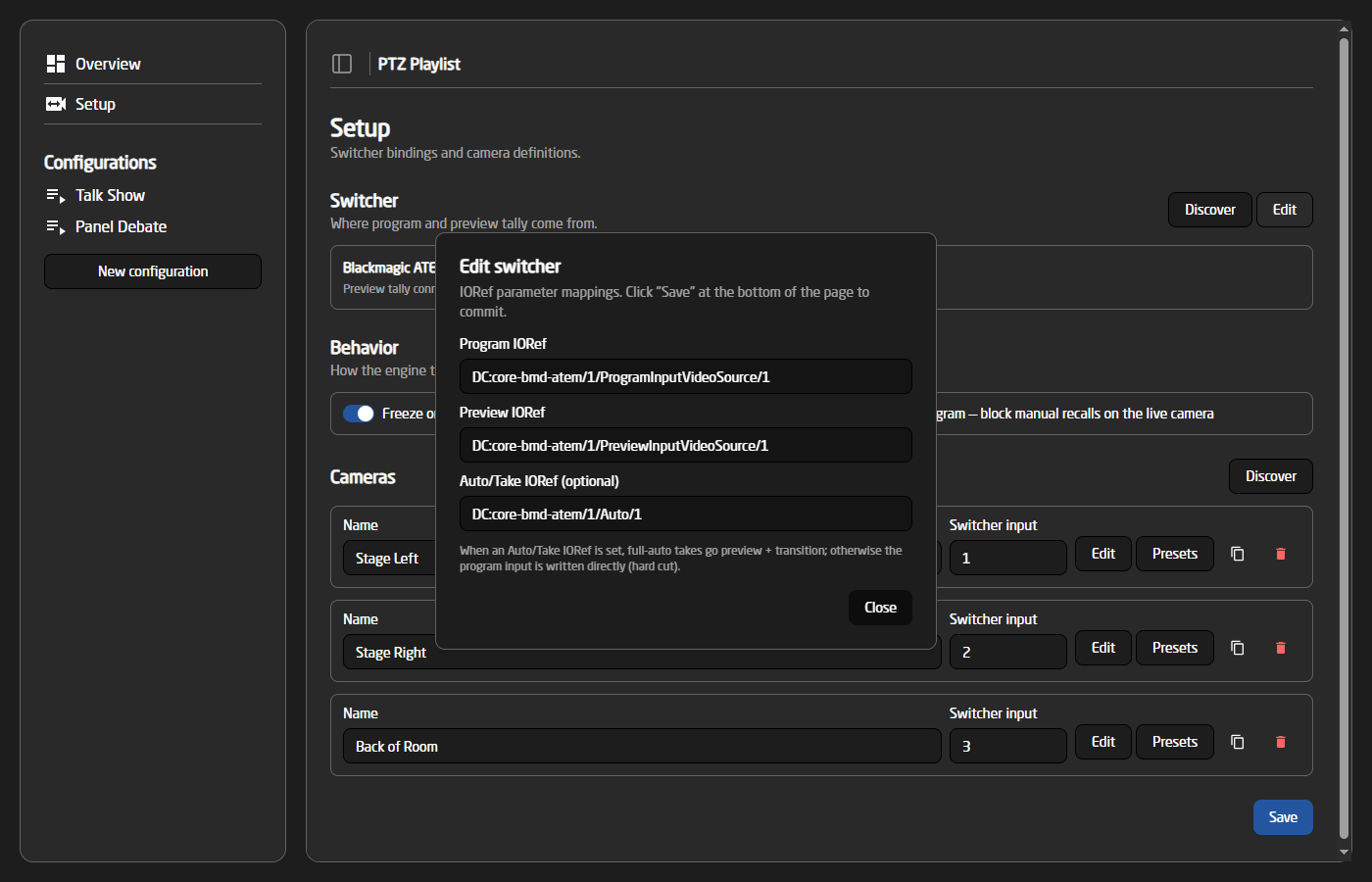](https://wiki.skaarhoj.com/uploads/images/gallery/2026-06/ptz-03-switcher-edit.png) - **Program IORef** — the program bus. Read for red tally, and written for direct takes. - **Preview IORef** — the preview bus. Read for green tally, and written when the autopilot stages a shot. - **Auto/Take IORef** (optional) — a transition trigger. When set, full-auto takes go preview + transition instead of cutting the program bus directly. ##### Behavior Two switches control how the engine treats cameras that are on air: - **Freeze on preview** — the autopilot will not move a camera that sits on the preview bus. - **Lock on program** — manual preset recalls (from the WebUI or a panel) are blocked on the camera that is live on program. ##### Cameras Each camera needs a name and its switcher input number. The 'Discover' button lists the PTZ cameras found on the connected cores, and can add several at once with their parameters auto-filled: [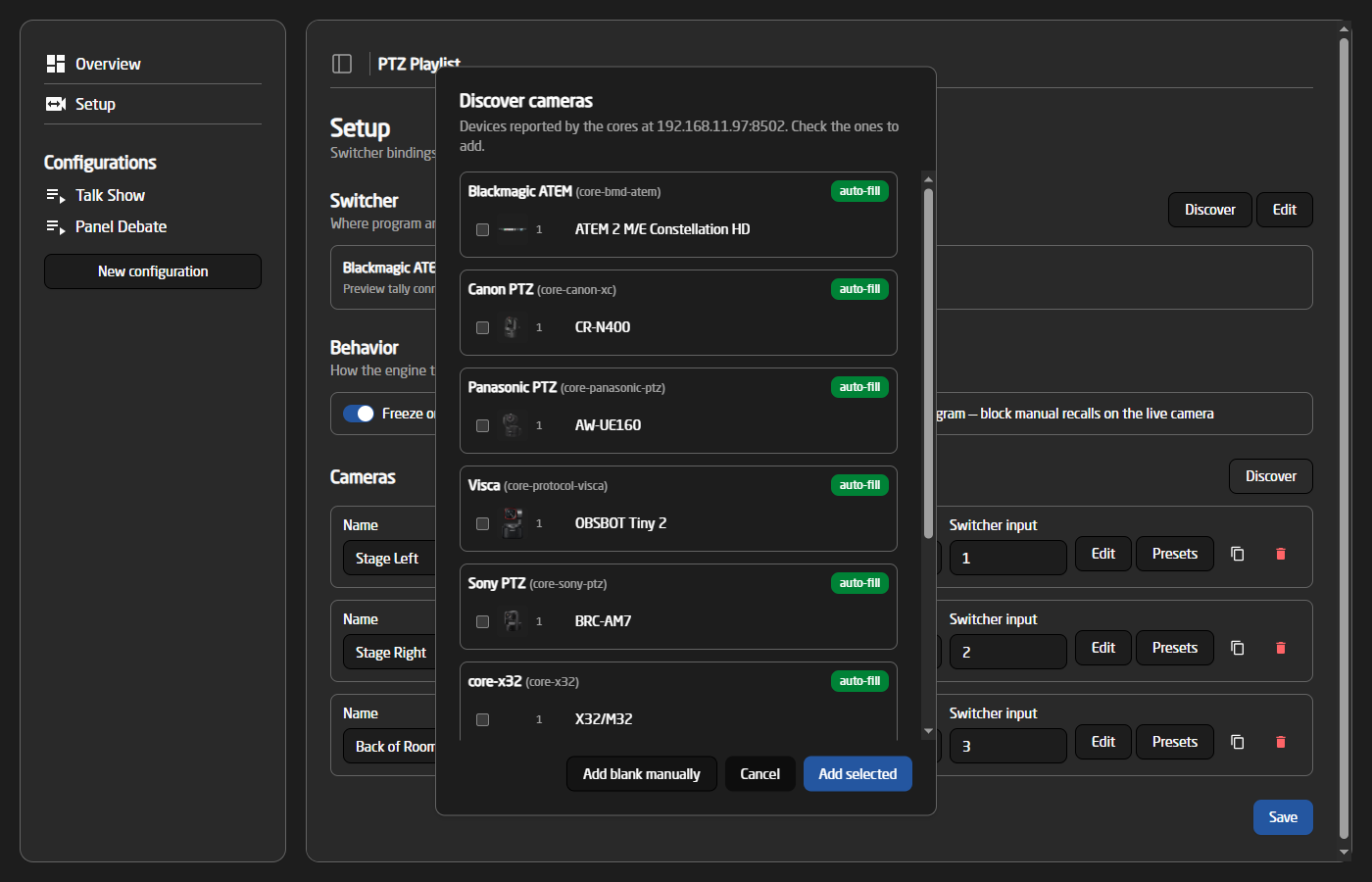](https://wiki.skaarhoj.com/uploads/images/gallery/2026-06/ptz-07-discover-cameras.png) The 'Edit' button on a camera opens the rest of its fields: [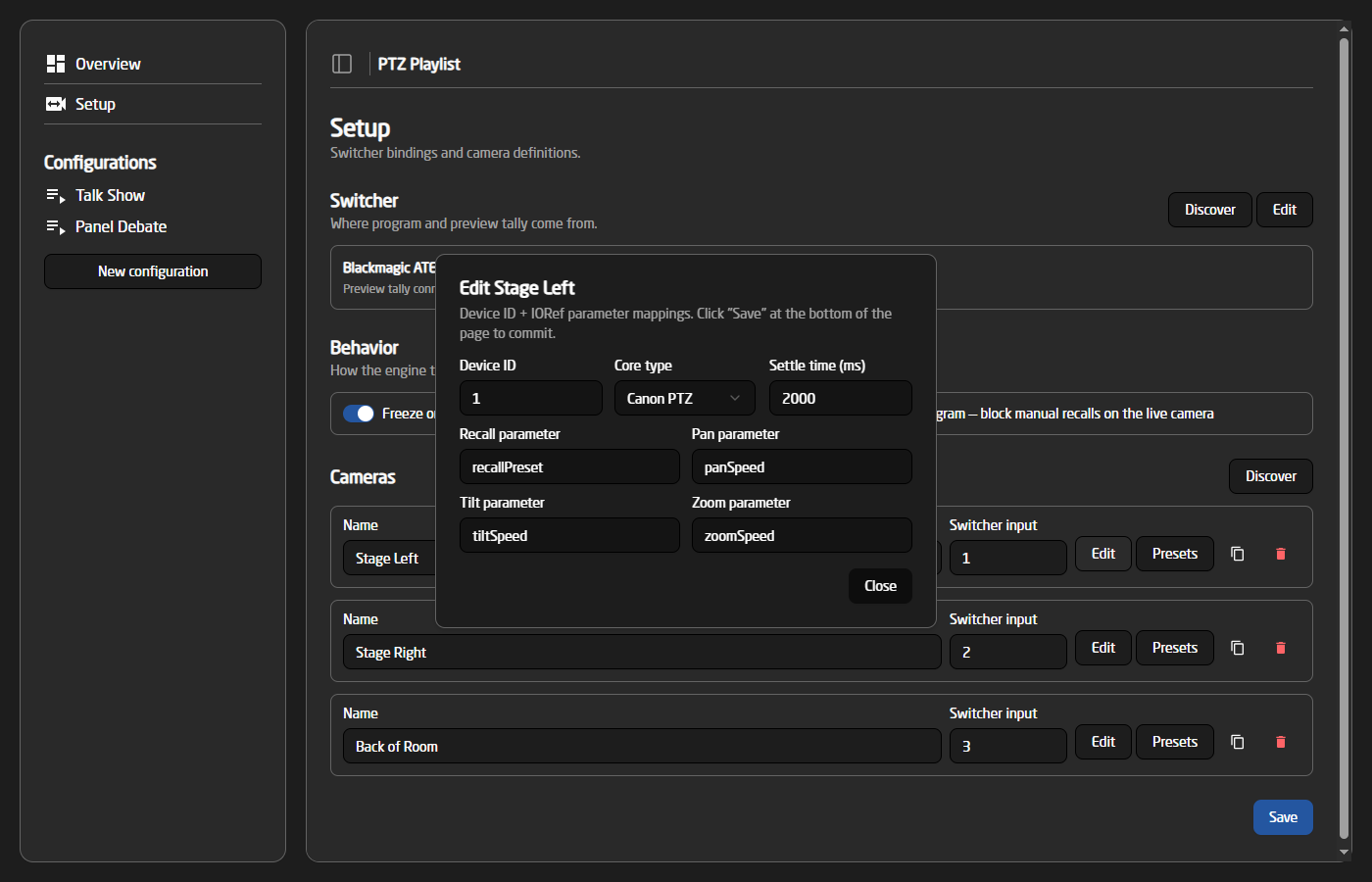](https://wiki.skaarhoj.com/uploads/images/gallery/2026-06/ptz-04-camera-edit.png) - **Device ID** and **Core type** — which core and device this camera is. Picking a core type auto-fills the standard parameter names for that manufacturer. - **Settle time** — how long the camera needs after a preset recall before it is safe to put on air. The autopilot waits this long before staging the shot on preview. Defaults to 2000 ms. - **Recall / Pan / Tilt / Zoom parameters** — the parameter names used to recall presets and to drive dynamic movements. #### Presets The 'Presets' button on a camera opens its preset library. Each camera has 20 slots, and each slot has a name, the preset number to recall on the camera, and a type. The play button fires the preset immediately, so every shot can be tested while editing. [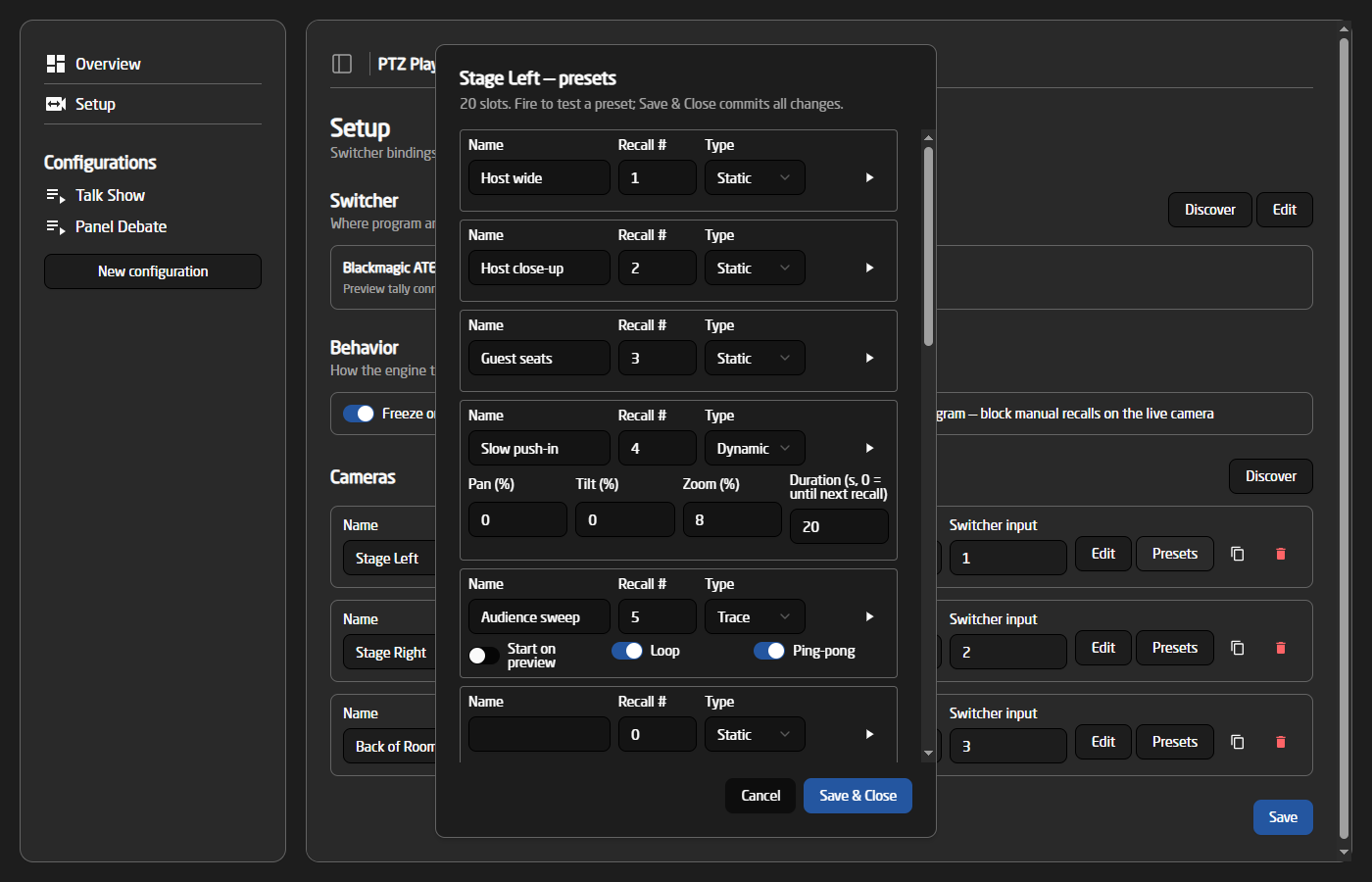](https://wiki.skaarhoj.com/uploads/images/gallery/2026-06/ptz-05-preset-library.png) There are three preset types: - **Static** — a plain preset recall. The camera moves to the stored position and stays there. - **Dynamic** — a preset recall followed by a slow movement. Pan, tilt and zoom are given as a relative speed from -100% to 100% (0 = axis unused), and the core automatically translates that into whatever speed values the specific camera expects. The movement starts once the camera has settled on the recalled position, and stops after the given duration — or, with a duration of 0, when the next preset is recalled on the camera. Use this for subtle pushes, drifts and creeps that keep a live shot alive. - **Trace** — plays a recorded camera trace (using the standardized dcTrace parameters available on PTZ cores). The trace number is the preset number. The trace is armed on recall and starts playing the moment the camera comes on program — or already on preview, if 'Start on preview' is set. 'Loop' and 'Ping-pong' control how the trace repeats. The trace is stopped automatically once the camera is fully off air.In the preset rotation buttons around the WebUI, dynamic presets are shown with an amber border and trace presets with a purple border, so the special shots are easy to spot.
### Configurations The sidebar holds a list of configurations, providing a way to set up different shows that can quickly be changed between. The active configuration can be switched from the WebUI or from a panel. Each configuration has its own autopilot settings and its own selection of cameras and presets: [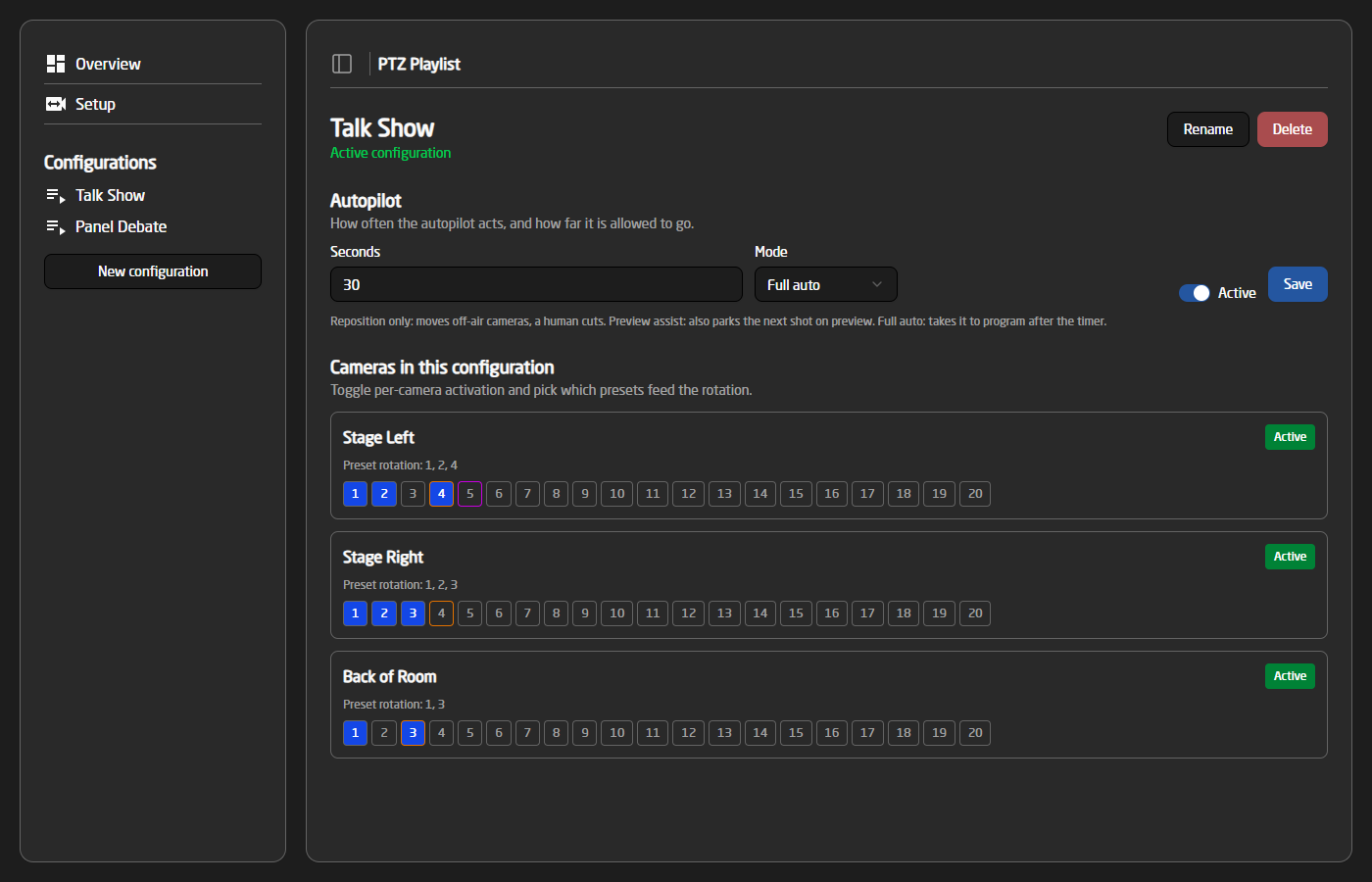](https://wiki.skaarhoj.com/uploads/images/gallery/2026-06/ptz-06-configuration-page.png) #### Autopilot - **Seconds** — how often the autopilot acts. In reposition mode this is the dwell per camera; in preview assist and full auto it is the time between shots. - **Mode** — Reposition only, Preview assist or Full auto, as described above. - **Active** — whether the autopilot runs when this configuration is active. It can also be started and stopped from the Overview page or a panel. #### Cameras in this configuration Each camera can be activated or deactivated for this configuration, and the numbered buttons select which of its presets are part of the rotation. The autopilot only uses active cameras and selected presets. When picking the next shot, the system avoids the presets it used most recently, so the rotation feels varied. Rotations with three or fewer presets are cycled in order instead. ### Overview The Overview page is the live operating view of the active configuration: [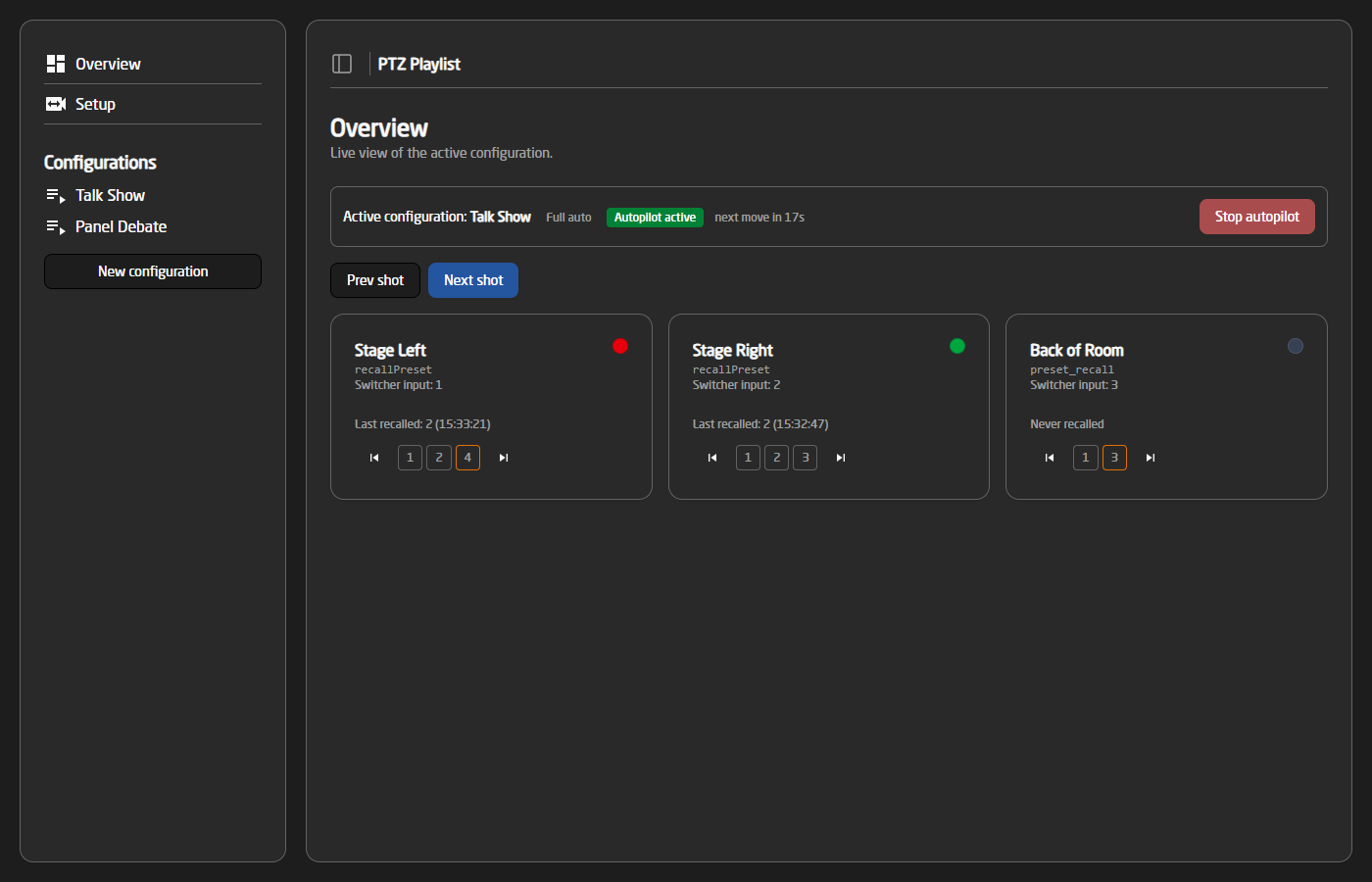](https://wiki.skaarhoj.com/uploads/images/gallery/2026-06/ptz-01-overview.png) The top strip shows the active configuration, the autopilot mode and state, and a countdown to the autopilot's next move, together with a start/stop button. Each camera has a tile with its tally state (red = program, green = preview), the last recalled preset, and a badge when the camera is settling, moving or playing a trace. The page also offers manual control: - **Next shot / Prev shot** — manually advance the rotation to a fresh shot, or go back to the previous shot from the history. Next shot is mode-aware: in preview assist and full auto, the new shot is staged for preview just like the autopilot would. - **Per-camera preset buttons** — fire a specific preset on a camera, or step the camera forward/backward through its rotation. ### Panel control The most important functions are also available as device core parameters, so they can be mapped to a Skaarhoj panel in Reactor: - **Autopilot** — start/stop the autopilot for the active configuration. - **Switch Configuration** — change the active configuration. - **Next Shot / Previous Shot** — same as the Overview page buttons. - **Selected Camera** + **Camera Next/Previous Preset** — pick a camera and step it through its rotation manually. - **Pause** — pause the whole engine. - **Current Configuration, Autopilot Countdown and Last Shot** — feedback parameters for panel displays, showing the running configuration, the seconds until the autopilot's next action, and the camera/preset of the most recent recall.