# vMix v25 +
### Connecting To vMix v25
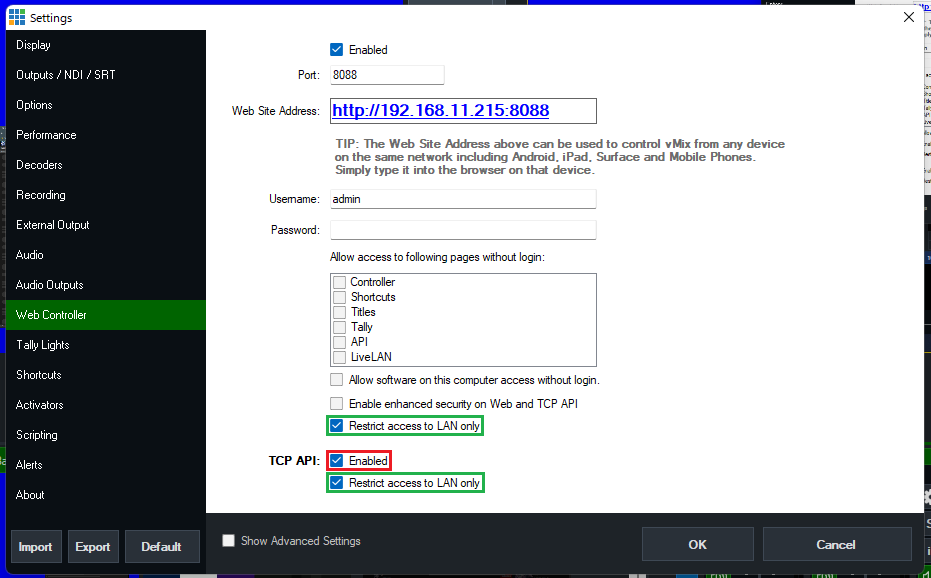
For your Blue Pills to control vMix v25 or v226, please check the setting marked in RED as that needs to be turned on, as shown below.
The settings marked in green are not required but recommended for the security of your vMix setup and to limit others from taking control from outside the LAN network.
**Note:** vMix v24 is not affected by this and will work out of the box. No changes are needed inside vMix.
[](https://wiki.skaarhoj.com/uploads/images/gallery/2022-05/vmix-v25-settings.png)
### Add device inside Reactor
Inside reactor you can add any vMix device like normal, and the only thing you need to add is the IP of your vMix machine.
We do have the option to change the port number used. Please **do not touch** it if you don't know what it does. On the Blue pills, we use the TCP port inside vMix, and not the HTTP port that the build-in web controller uses. The vMix TCP port is not user-configurable but locked to port **8099**.
You can still change the port inside reactor for people running very fancy port re-mappings on their network or are running vMix inside a virtual machine, as many do on the AWS platform.
### Troubleshooting Connection
- It is not necessary to use the earlier vMix Bridge or vMix Proxy programs. If not using UniSketch panels that are independently connected to vMix,please close those programs.
- If the connection is unstable, try navigating to the Web Controller settings in vMix and checking off the option under Allow Access to Following Page without Login options. This should stabilize it.