
License Tiers
FlowGrid runs at one of three licence tiers. The tier decides how much you can build and which extra features are available. It never switches the router off — a system with no FlowGrid licence at all still routes, on the Free tier.
The tiers
| Free | Medium | Full | |
|---|---|---|---|
| Sources + destinations (one shared budget) | 20 | 100 | Unlimited |
| Levels | 3 | 5 | Unlimited |
| Tielines | 2 | 10 | Unlimited |
| Inserts | 2 | 10 | Unlimited |
| Salvos | 3 | 10 | Unlimited |
| FlowGrid instances on one system | 1 | 1 | Unlimited |
| User accounts & roles | — | Yes | Yes |
| Third-party control (Videohub, SW-P-08) | — | Yes | Yes |
| AI-assisted topology editing | — | — | Yes |
Sources and destinations share one budget. On Medium’s 100, a 50 × 50 router and a 25 × 75 router both fit — spend it however your plant needs.
Where to see yours
Open Health in the sidebar. The License card names your tier and shows, line by line, what you are using against what you are allowed.
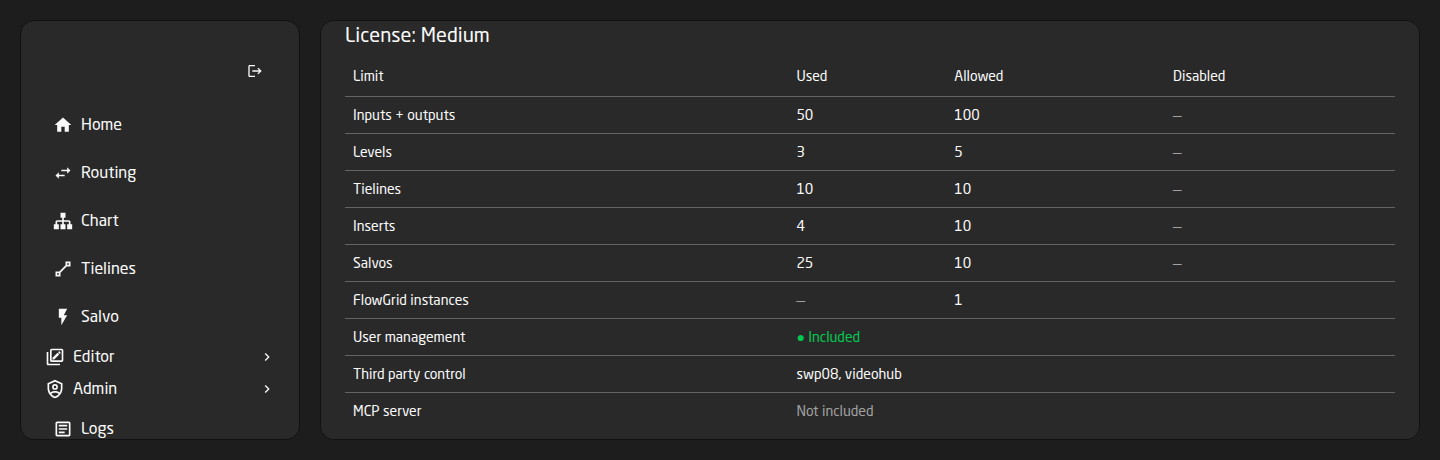
- Used — what your configuration actually contains.
- Allowed — the cap. ∞ means no limit.
- Disabled — how many are switched off because they are over the cap. A dash means none.
- The feature rows read • Included or Not included.
Used can legitimately read higher than Allowed. That is the point of the card: it shows you exactly how far over you are.
What happens when you are over the limit
This is the part worth understanding, because FlowGrid is deliberately gentle about it.
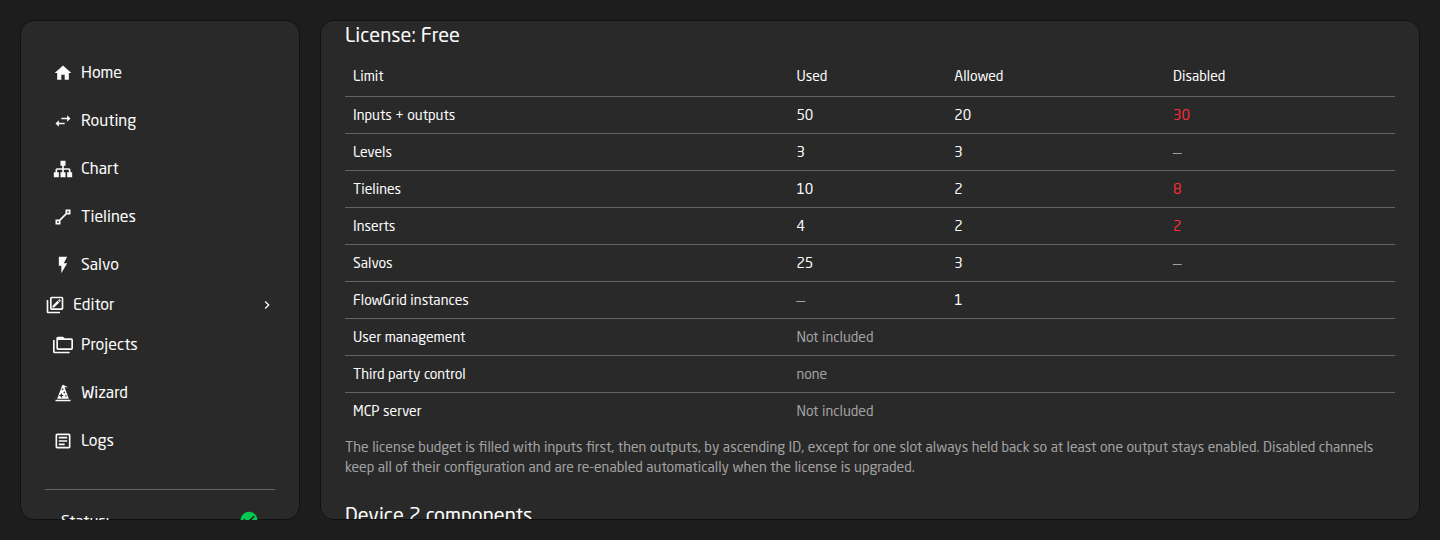
Nothing is ever deleted. A configuration that is too big for its licence keeps all of its data — names, colours, mappings, tally, labels, groups. The excess is only switched off, and it comes back automatically the moment the licence is upgraded. No re-import, no rebuild.
Which channels get switched off is predictable, not random: the budget is filled with sources first, then destinations, by ascending ID, with one slot always held back so at least one destination stays working. So your lowest-numbered channels keep running.
A switched-off channel:
- Does not appear as a choice on panels, in Reactor or on the Routing page.
- Cannot be routed — attempts are refused, saying it is disabled by the licence limit.
- Shows to a third-party controller as an unnamed slot that refuses routes.
A switched-off level is treated as a level that destination simply does not have, so a multi-level route still completes on the levels you do have rather than failing outright.
Trying to add something past the limit
- In the Editors, adding one more source, destination, level, tieline or insert past the cap is refused, with a message saying the licence allows so many and to remove one or upgrade.
- Importing a project, uploading a spreadsheet or finishing the Setup Wizard is allowed to succeed even when the result is too big — you get a warning telling you exactly how many will be switched off. Better to have the whole configuration on the system, disabled, than to be blocked from loading it.
The feature limits in practice
- User accounts & roles — on Free, the login system is switched off and the Users and Roles pages disappear; everyone reaching the web page has full access. Your accounts are not deleted, and they come straight back on Medium or Full.
- Third-party control — on Free, the Videohub and SW-P-08 servers do not start, so external panels and Companion cannot connect. See Controlling FlowGrid from Other Systems.
- Salvos — slots beyond the cap still appear in the selector, but firing one fails with ‘Salvo ID out of range’. Keep your working salvos in the low-numbered slots.
- FlowGrid instances — the cap is per system, not per instance. Running several small FlowGrids on one box is not a way around a small licence; instances past the cap simply do not start.
Getting and changing a licence
FlowGrid does not have a licence-entry screen of its own. It reads the licences already activated on the SKAARHOJ system it runs on, so a licence is added the same way as any other SKAARHOJ licence for that device.
A licence change is picked up at startup, so FlowGrid must be restarted before the new limits apply. Check the License card afterwards to confirm the tier name changed.
If a system holds more than one FlowGrid licence they combine at their best: the highest of every limit and every feature that any of them grants. The card then names them together, for example ‘Medium + Full’.
If the card reads “Unrestricted (development)”, you are on a development build rather than a licensed appliance. Limits are not enforced there, so what you see is not what a customer system will do.
Planning ahead
- Add up sources plus destinations together, not separately.
- Count tielines from the number of simultaneous cross-device paths you need, including IFB returns — see Tielines and Inserts.
- If you need external panels or Companion, or more than one login, you need at least Medium.
- Build the configuration you actually want even if today’s licence is smaller. It will be sitting there complete, ready to switch on.