
Panasonic Switcher - AV-UHS500
Panasonic AV-UHS500
The Panasonic Switcher core controls the Panasonic AV-UHS500 live switcher over the network, using Panasonic's external control protocol.
Ports
The core uses two network connections to the switcher:
| Connection | Direction | Default port | Required |
|---|---|---|---|
| TCP control | SKAARHOJ controller to switcher | 62000 | Yes |
| UDP update notifications | Switcher to SKAARHOJ controller | 65000 | Recommended |
The TCP connection carries all commands and status queries.
The UDP connection lets the switcher report source changes the moment they happen, for example when an operator presses a crosspoint on the switcher panel. Without it the core still picks up changes by polling, but slower: PGM and PVW within a fraction of a second, other buses within a few seconds.
Please note: The switcher sends UDP notifications to a fixed IP address; if the address will change device stops receiving UDP feedback
Tip: All switcher settings below can also be made from a PC with Panasonic's Software Control Panel (AV-SF500) for Windows and Mac. Its 'Menu Panel' screen shows the switcher's menu and lets you operate it remotely. Only one PC with the Software Control Panel can be connected to the switcher at a time.
Switcher network settings
Press CONF/SYS on the switcher and open SYSTEM. The switcher's IP address is shown on the NetWork1 and NetWork2 tabs. (see screenshot)
Enable external control on the switcher
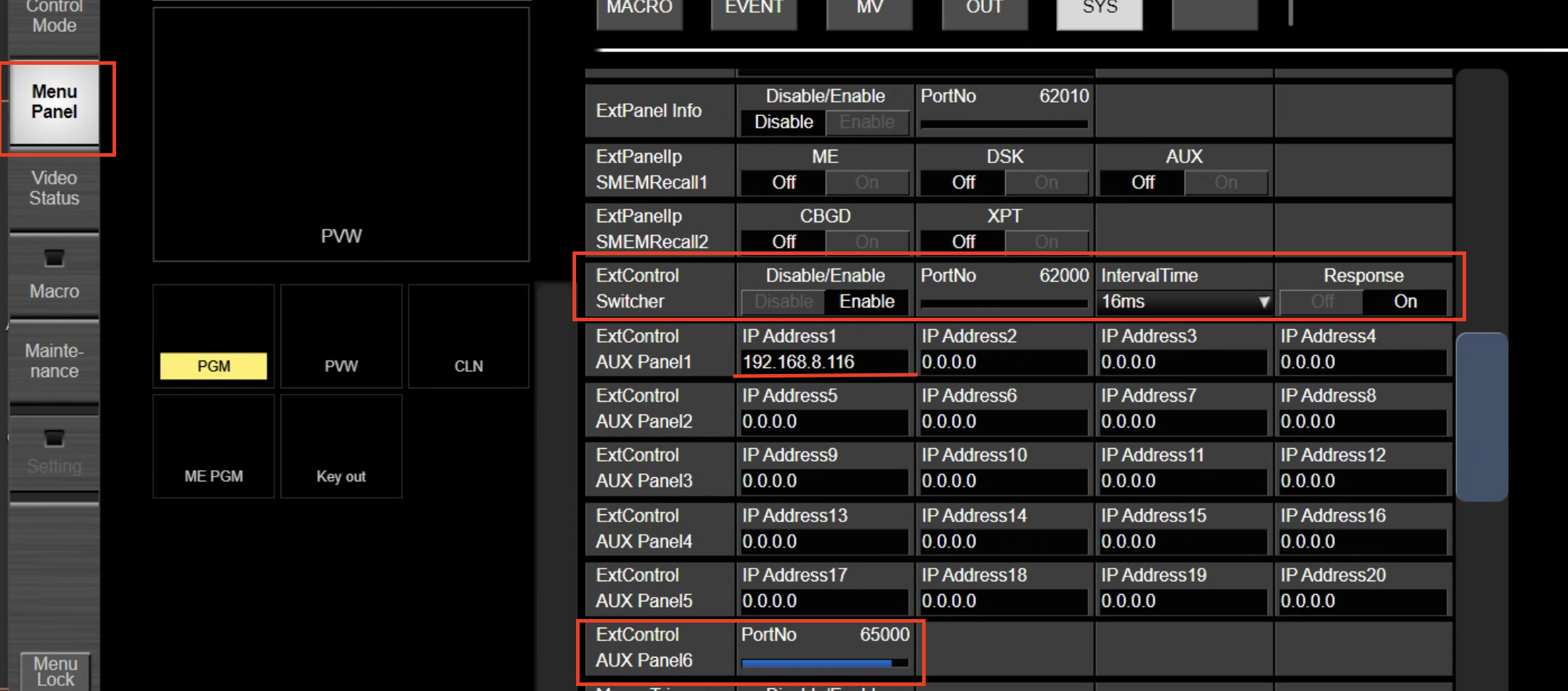
External control is disabled by default. While it is disabled, the switcher refuses the connection from the SKAARHOJ controller.
- Press CONF/SYS to open the System menu.
- Open the ExtControl Switcher submenu.
- Disable/Enable - must be enabled
- PortNo - the TCP port, default 62000, just keep it (range 62000-65535)
- IntervalTime - leave at the default 16ms
Set the UDP destination on the switcher
The switcher only sends UDP notifications to the IP addresses in its list. The list holds up to 20 addresses.
- Open the ExtControl AUX Panel1 sub menu.
- Enter the IP address of your SKAARHOJ controller in a free slot (IP Address1 to IP Address4). If these are taken, ExtControl AUX Panel2 to AUX Panel5 hold IP Address5 to IP Address20.
- Open the ExtControl AUX Panel6 sub menu.
- PortNo - the UDP port, default 65000 (range 60000-65535). It must match the UDP Port device setting.
Add device
When adding the device, select the Model Id: AV-UHS500. Then fill in the Device Details:
| Setting | Value |
|---|---|
| IP | IP address of the switcher |
| Port | TCP port, must match PortNo in ExtControl Switcher. Default 62000 |
| UDP Port | UDP port, must match PortNo in ExtControl AUX Panel6. Default 65000. |
Port and UDP Port are advanced settings. You only need to change them if you changed the ports on the switcher.
Check the connection
- The device shows as connected in Reactor.
- Select a different PVW source on the switcher panel. The SKAARHOJ panel should follow immediately. If it only follows after a few seconds, the UDP notifications are not arriving; see below.
Troubleshooting
| Symptom | Cause | Solution |
|---|---|---|
| Device never connects | External control is disabled | Set Disable/Enable to Enable in ExtControl Switcher |
| Device never connects | Wrong IP address or TCP port | Compare the switcher IP and PortNo with the Device Details |
| Device never connects | Switcher not reachable | Check cabling, subnet and routing between controller and switcher |
| Connected, but changes on the switcher panel show up with a delay | Controller IP is not in the switcher's list | Add it in ExtControl AUX Panel1 to 5 |
| Connected, but changes on the switcher panel show up with a delay | UDP port mismatch | Make PortNo in ExtControl AUX Panel6 match UDP Port in Reactor |
| Notifications stopped after a restart | Controller got a new IP address from DHCP | Give the controller a static IP and/or update the switcher's list |