
Art-Net DMX
The ArtNet DMX device core lets a SKAARHOJ Blue Pill controller send and receive DMX lighting data, either as Art-Net over the network or through a USB-to-DMX adapter plugged into the Blue Pill.
Typical uses:
- Control lights, dimmers, LED fixtures or a lighting desk input directly from SKAARHOJ panels, channel by channel.
- Fire simple lighting looks next to camera and switcher control: a Master fader per universe, Blackout and Fade To Black on a button.
- Read DMX values coming from a lighting desk and use them as feedback or triggers on a panel.
- Turn a Blue Pill into a small Art-Net ↔ DMX converter with a USB DMX adapter.
Development status: The Art-Net models (Unicast, Broadcast, Receiver) are beta. The USB models (USB DMX Output, USB DMX Input) are concept: they have been tested with an Open DMX USB adapter, but not yet with every adapter type.
Models
| Model | Direction | What it does |
|---|---|---|
| Unicast | Send | Sends one or more Art-Net universes to a single node or device IP address. |
| Broadcast | Send | Sends one or more Art-Net universes to every device on the network. Use only one Broadcast device per core. |
| Receiver | Receive | Receives one or more Art-Net universes from any sender on the network and shows the channel values as parameters. |
| USB DMX Output | Send | Sends one DMX universe out of a USB-to-DMX adapter. In Bridge Mode it converts an incoming Art-Net universe to DMX. |
| USB DMX Input | Receive | Receives one DMX universe from a USB-to-DMX adapter. In Bridge Mode it also re-sends that universe as Art-Net. |
You can add several devices of different models to the same core, for example a Receiver and two Unicast nodes.
What you need
| Item | Notes |
|---|---|
| Blue Pill controller | Any Blue Pill product with the ArtNet DMX core installed. |
| Art-Net node or fixture | For the Art-Net models. Must be on the same network as the Blue Pill. |
| USB-to-DMX adapter | Only for the USB models. Supported: Open DMX USB type adapters and adapters using the Enttec DMX USB Pro protocol. One adapter handles one direction (output or input). |
Setup: Art-Net
- In Reactor, press Add Device and pick ArtNet DMX.
- Choose the model: Unicast, Broadcast or Receiver.
- For Unicast, enter the IP address of the Art-Net node.
- Set the universes:
- Universe Amount: how many universes this device sends or receives.
- Start Net (0–127), Start SubNet (0–15) and Start Universe (0–15): the Art-Net address of the first universe. The following universes count up from there.
- Press Save.
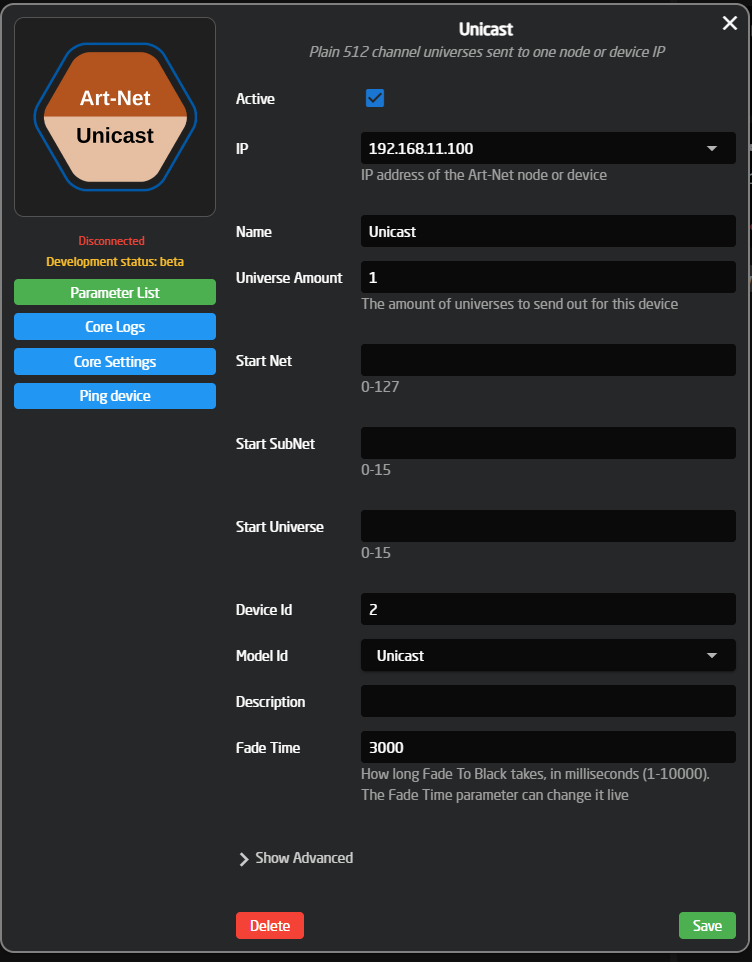
A Unicast device shows Connected once the node answers the core's Art-Net poll (ArtPollReply). The node's name and description then appear as the Node Name and Node Description parameters. Broadcast and Receiver devices always show as connected, as broadcast has no connection to check.
Some nodes don't answer Art-Net polls. If a Unicast device stays disconnected while the lights respond, turn off Check Connection in the core settings (see below).
Setup: USB DMX adapter
- In the Blue Pill web interface, go to Settings and set Active USB-port to USB-A. While it is set to USB-Micro, the Blue Pill can't see the adapter.
- Plug the USB-to-DMX adapter into the Blue Pill's USB-A port.
- In Reactor, press Add Device, pick ArtNet DMX and choose USB DMX Output or USB DMX Input.
- Press Save. The device shows Connected when the adapter is found.
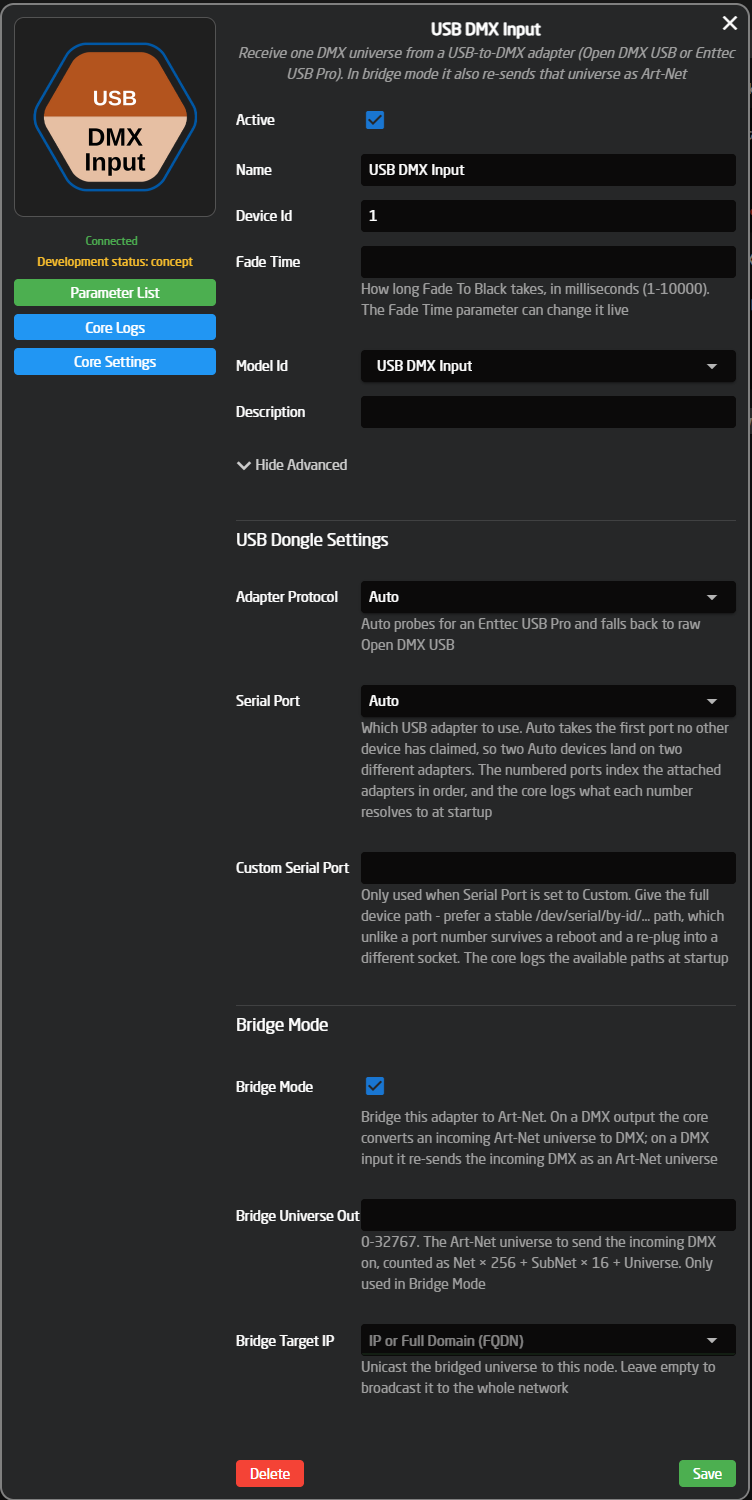
The defaults (Adapter Protocol: Auto, Serial Port: Auto) work for a single adapter. Open Show Advanced to change them:
| Setting | Description |
|---|---|
| Adapter Protocol | Auto checks for an Enttec USB Pro and otherwise uses Open DMX USB. Set it by hand if detection picks the wrong one. |
| Serial Port | Auto takes the first adapter no other device uses, so two Auto devices get two different adapters. Port 1–10 picks an adapter by number. Custom uses the path in Custom Serial Port. |
| Custom Serial Port | A fixed device path, for example /dev/serial/by-id/…. Unlike a port number, this stays the same after a reboot or when the adapter is moved to another USB socket. The core log lists the available paths at startup. |
| Refresh Rate | (USB DMX Output only) Maximum DMX frames per second, 1–44. Lower it if a cheap adapter drops frames. |
Bridge Mode
With Bridge Mode on, a USB device connects its adapter directly to Art-Net, so the Blue Pill works as an Art-Net ↔ DMX converter.
| Model | Bridge direction | Settings |
|---|---|---|
| USB DMX Output | Art-Net universe → DMX out | Bridge Universe In: the Art-Net universe to convert. Bridge Source IP: only accept it from this sender (empty = any sender). Merge Mode: how Art-Net combines with the panel's channel values (see below). |
| USB DMX Input | DMX in → Art-Net universe | Bridge Universe Out: the Art-Net universe to send on. Bridge Target IP: send to this node only (empty = broadcast to the whole network). |
Bridge universes are entered as one number from 0 to 32767, counted as Net × 256 + SubNet × 16 + Universe. For example Net 0, SubNet 1, Universe 2 is universe 18.
Merge Mode (USB DMX Output):
| Mode | Behaviour |
|---|---|
| HTP | Highest takes precedence: per channel, the higher of the Art-Net value and the panel value is sent. |
| LTP | Latest takes precedence: per channel, whichever changed last is sent. |
| Art-Net only | The panel's channel values are ignored. Blackout, Fade To Black and Master still apply. |
The DMX output follows the Art-Net source at its own rate, up to 44 frames per second. If the source stops sending for 3 seconds, it drops out of the merge, so the lights don't hold the last values of a source that has been switched off.
Core settings
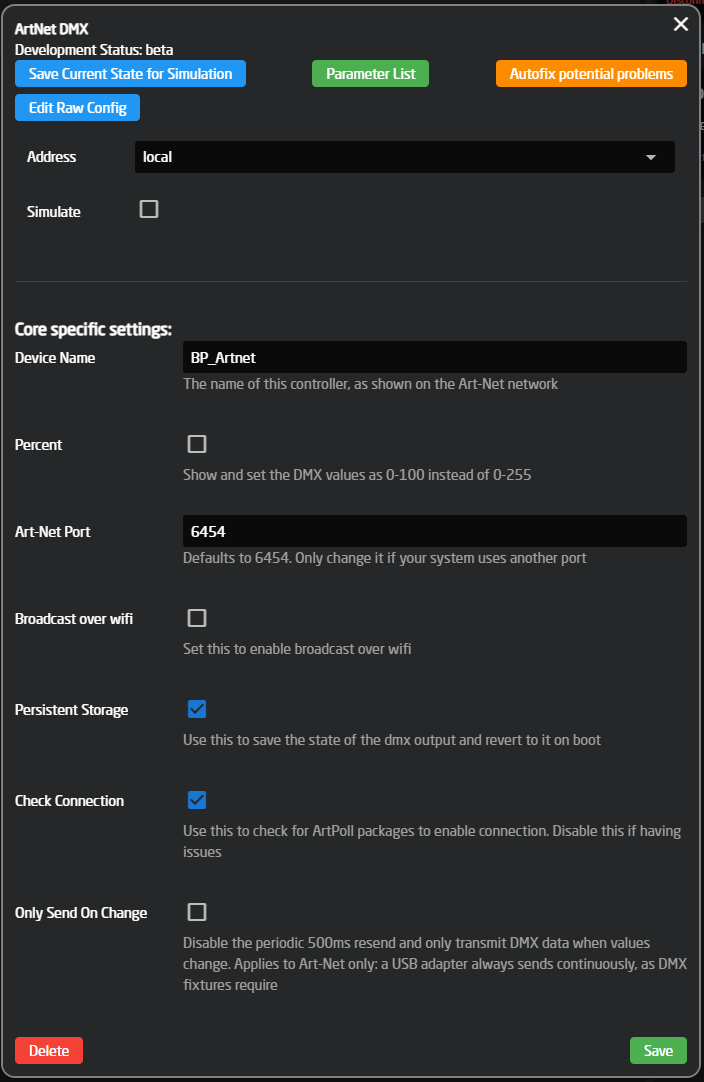
Open the core settings with the gear icon next to ArtNet DMX in the device list. These apply to all devices in the core.
| Setting | Description |
|---|---|
| Device Name | The name the Blue Pill shows on the Art-Net network (in ArtPoll replies). |
| Percent | Show and set channel values as 0–100 instead of 0–255. |
| Art-Net Port | UDP port for Art-Net. Leave it at 6454 unless your system uses another port. |
| Broadcast over wifi | Use the Blue Pill's Wi-Fi instead of the Ethernet port for Art-Net. |
| Persistent Storage | Remember the DMX output values and restore them after a restart. On by default. |
| Check Connection | Use Art-Net poll replies to show whether a Unicast node is connected. Turn it off for nodes that don't answer polls. |
| Only Send On Change | Art-Net is normally re-sent every 500 ms, so nodes keep their output. Turn this on to send only when a value changes. USB adapters always send continuously, as DMX fixtures need. |
Parameters
| Parameter | Models | Description |
|---|---|---|
| Transmit | Unicast, Broadcast, USB DMX Output | The value of each DMX channel (1–512) per universe. |
| Master | Unicast, Broadcast, USB DMX Output | A 0–100 % master level per universe, scaling every channel in it. |
| Receive | Receiver, USB DMX Input | The received value of each DMX channel per universe (read-only). |
| Blackout | All | Cuts the output to black instantly, or back to live. |
| Fade To Black | All | Fades the output to black over the Fade Time, or back up to live. |
| Fade Time | All | How long Fade To Black takes, in milliseconds (0–10000). Starts at the device's Fade Time setting. |
| Clear | All | Sets every channel to 0, including the stored values. |
| Connected, Node Name, Node Description | Unicast, Receiver | Connection status and the node's own name and description. |
| Serial Port, Adapter Protocol, Frame Rate | USB models | Which adapter is in use, its protocol (with firmware version for a USB Pro), and frames received per second. A frame rate of 0 means connected, but nothing is arriving. |
Blackout and Fade To Black share one state: the output is either black or live. After a Fade To Black, pressing Blackout cuts straight back to live, and after a Blackout, pressing Fade To Black fades back up. Both only mask the output: the channel values are kept, so going live restores the same look. Use Clear to reset the values.
The full parameter list per model is in the core's device manual on the Blue Pill and on devices.skaarhoj.com.
Limitations
- A USB adapter handles one universe in one direction. For both input and output, use two adapters (one USB DMX Output and one USB DMX Input device).
- Only one Broadcast device per core is used. Add more universes to that device instead of adding a second one.
- RDM is not supported.
- USB adapters are powered from the Blue Pill's USB-A port, which supplies about 500 mA. Use a powered USB hub if an adapter needs more.
Troubleshooting
| Symptom | What to check |
|---|---|
| Unicast device stays Disconnected, but the lights respond | The node doesn't answer Art-Net polls. Turn off Check Connection in the core settings. |
| No lights respond | IP address (Unicast), the Start Net / SubNet / Universe values against the node's settings, and that the node is on the same network and subnet as the Blue Pill. |
| Values arrive on the wrong universe | Art-Net universe numbering: some nodes and desks count from 1, the core counts from 0. Try one universe lower or higher. |
| USB device stays Disconnected | Active USB-port is set to USB-A in the Blue Pill settings, and the adapter is plugged in. Check the core log (Core Logs) for the serial ports found at startup. |
| USB DMX Input is connected, with the warning "No DMX data received" | The adapter is found, but no DMX signal is coming in. Check the DMX cable, and that the source is sending. |
| Two USB adapters are swapped after a reboot | Set Serial Port to Custom and enter each adapter's /dev/serial/by-id/… path. |
| Flicker or dropped frames on a USB DMX Output | Lower the Refresh Rate, or set Adapter Protocol to the adapter's type instead of Auto. |
| Bridged DMX output stays dark | Frame Rate shows whether Art-Net frames arrive. If 0: check Bridge Universe In and Bridge Source IP. |