
Projects
A project is your whole FlowGrid configuration in one file: the layout, the current routing, the salvos and the users. The Projects page is how you back it up, move it to another system, keep several show configurations side by side, and get back to a known-good state.
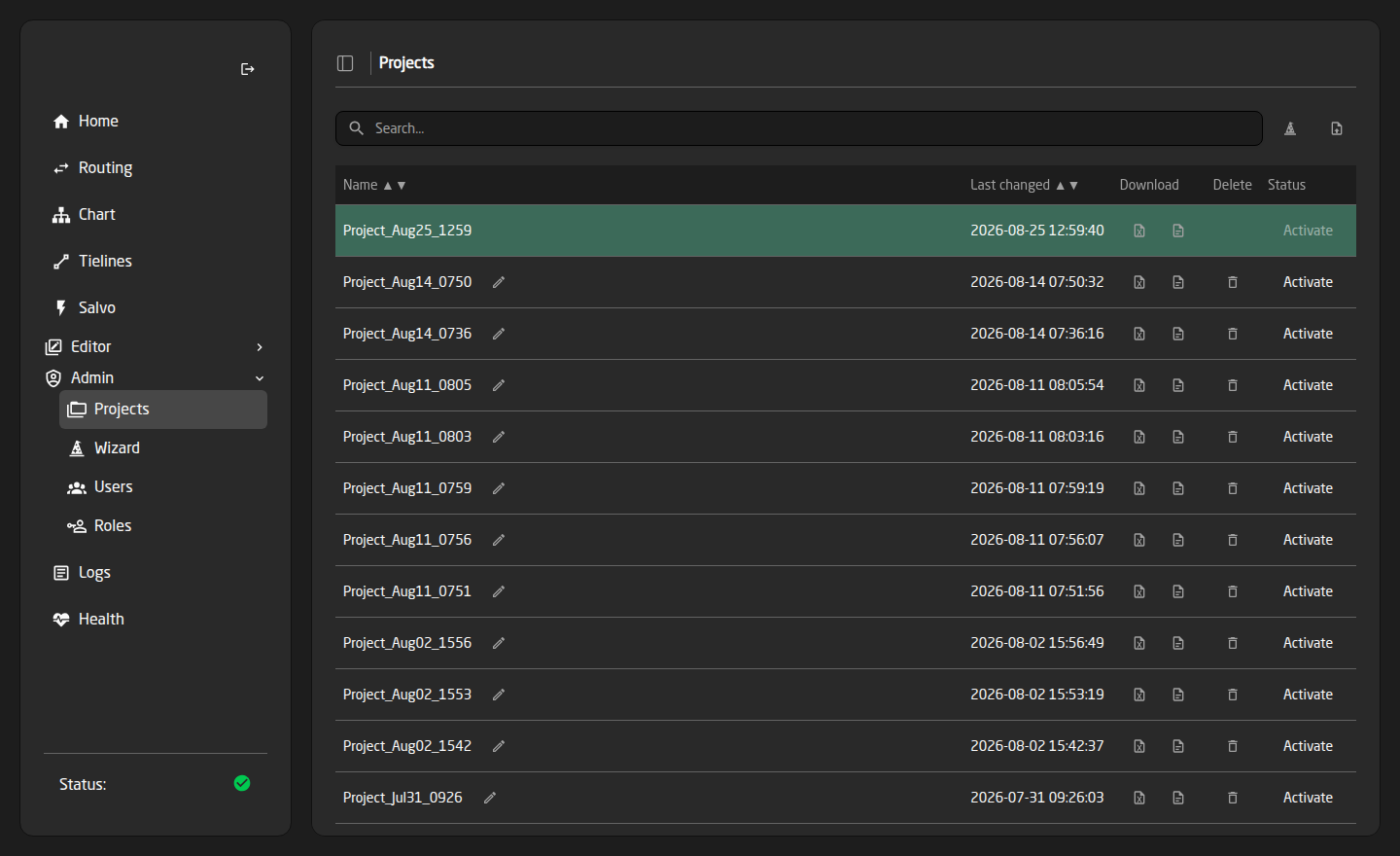
Projects are listed newest-changed first, with a search box for finding one by name. The green row is the one currently running; it cannot be deleted or renamed while it is active.
What is inside a project
- Topology — the layout: levels, devices, sources, destinations, tielines, inserts and groups.
- State — the routing as it stood: which source is on which destination, and which destinations were protected.
- Salvos — every stored routing snapshot.
- Users — the accounts and roles.
The whole thing is a single .fgp file, which is what you download, email, and archive.
Making a backup
Use the Download Project icon on the active project’s row. That file is a complete restore point.
Take one before every significant change — a wizard rebuild, a bulk edit, a project activation. It costs a few seconds and it is the only thing that reliably undoes a mistake.
The Download Excel icon gives you the layout as a spreadsheet instead. That is useful for reviewing a large configuration or handing it to someone else, but it does not carry the routing, salvos or users.
Bringing a project in
Press Upload Project, or drag a file onto the page. Two kinds are accepted:
- An
.fgpproject archive — the full snapshot, as downloaded from any FlowGrid. - An
.xlsxconfiguration spreadsheet — becomes a new layout under that filename.
Uploading only adds the project to the list. Nothing changes on the router until you activate it.
Activating a project
Press Activate on the row and a dialog asks what to recall. You do not have to take all of it.
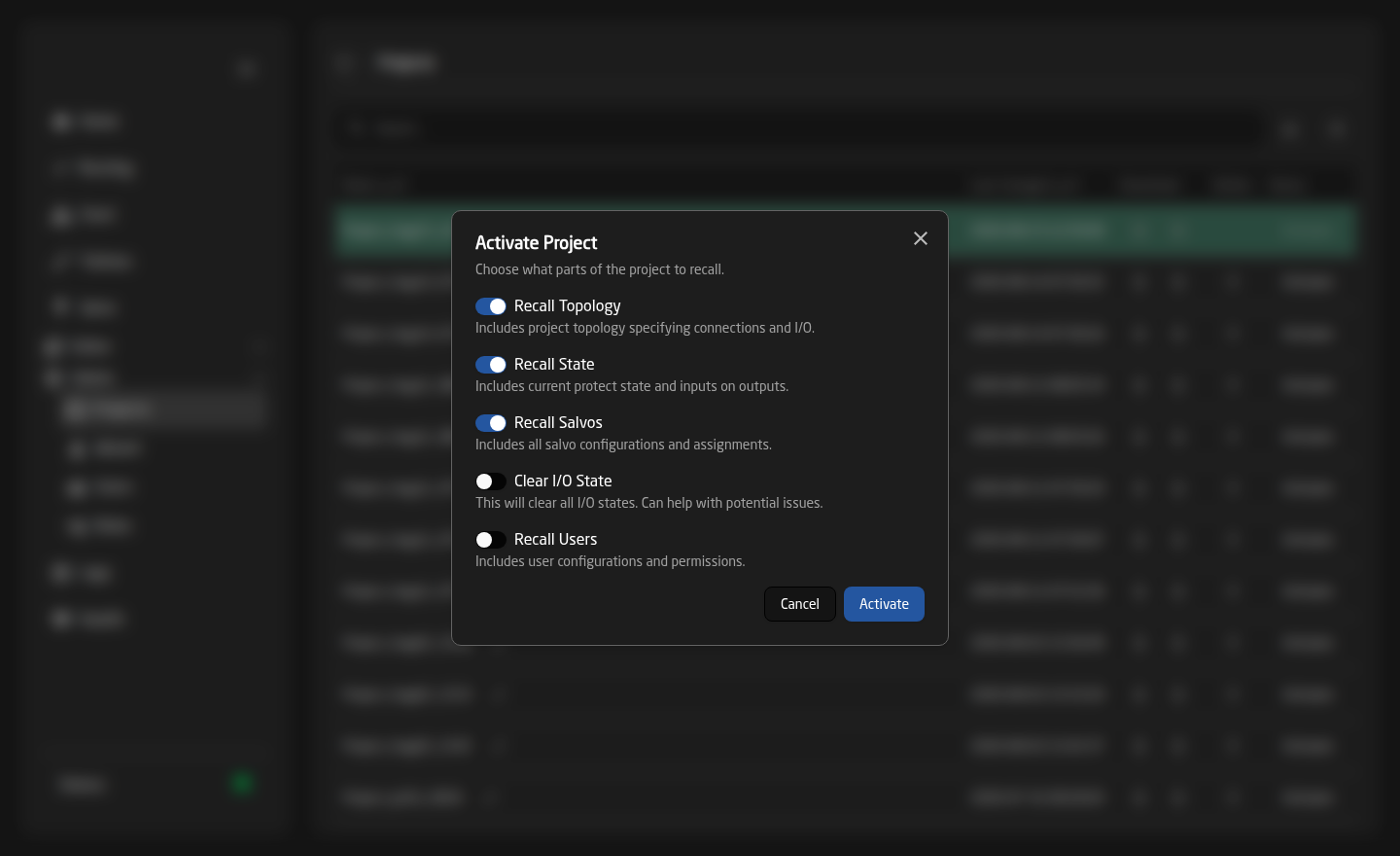
- Recall Topology — the layout. On by default.
- Recall State — put the routing and the protection locks back the way they were when this project was saved. On by default. Turn it off to load a layout without disturbing what is currently on air.
- Recall Salvos — the stored snapshots. On by default.
- Clear I/O State — start from nothing routed. Off by default; useful when the current state is confused.
- Recall Users — the accounts and roles from the file. Off by default, which is usually what you want: it stops an imported project replacing your own logins with someone else’s.
Activating replaces the running configuration and briefly reloads FlowGrid. Routing is interrupted while it happens, so do it between shows.
The configuration that was running is backed up automatically first, so it stays in the list and you can go back to it.
Renaming and deleting
The pencil renames a project; the trash deletes it after a confirmation. Neither is offered for the active project.
Deleting a project removes it from the system for good. If it is your only copy of a configuration, download it first.
Ways people use this
- Show configurations — one project per production, activated as the day changes.
- Safe experimenting — download a backup, rebuild in the wizard, activate the new one, and go back to the download if it does not work out.
- Commissioning — build offline on a spare system, download, upload to the real one.
- Known-good fallback — keep one project that always works, ready to activate under pressure.
Troubleshooting
- Activated, but the routing is not what I expected — Recall State was off, so the layout came across but the crosspoints did not.
- I cannot log in after activating — Recall Users was on and the project carried different accounts. Activate your backup with only Recall Users ticked.
- Devices are offline after activating — the project was built for different equipment. Check the Devices editor and the sidebar Status block.
- Sources or destinations are missing — the project is larger than your licence allows. Check the License card; nothing has been deleted, only switched off.
- The Projects page is not in the sidebar — your role does not have Projects access.